A focused first impression
Design a minimal Direct Link with your own media, colors and one clear call to action. Give visitors a transparent path to the full creator page.
Entry page→Full creator page
YOUR CREATORS. ONE CONNECTED WORKSPACE.
Start with a focused entry page. Open up a richer creator experience. Keep every page, domain and team in one place.
A private workspace for your creator network.
ROOM TO CREATE. TOOLS TO MANAGE.
From a single page to a growing roster, keep the details together without losing anyone’s individuality.
Design a minimal Direct Link with your own media, colors and one clear call to action. Give visitors a transparent path to the full creator page.
Build rich Landing Pages in Page Studio with videos, galleries, carousels, social links and flexible layouts.
Connect your own domain to a Direct Link. Review connection and HTTPS status from the workspace.
View entry visits and CTA clicks separately from Landing Page traffic and destination clicks.
Organize Direct Links and Landing Pages in groups. Move and rename them without changing public addresses.
Use agency workspaces, team assignments and roles to control who can edit, publish and manage destinations.
INSIDE LINKQORA
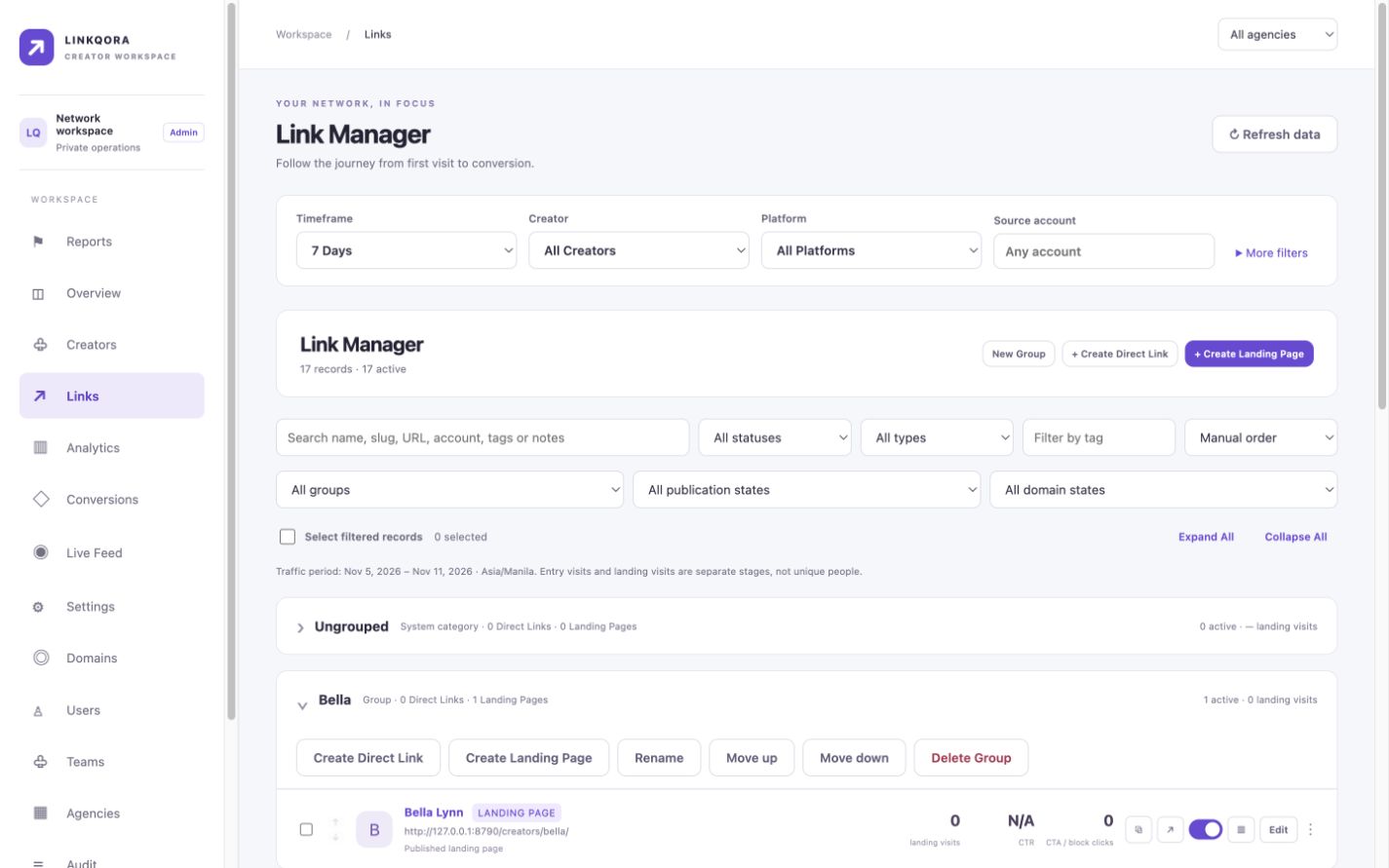
The actual Link Manager, shown with local preview data. Clear groups, distinct page types and controls that stay close to your work.
FROM IDEA TO A PUBLIC PAGE
Create or select a group for your creator, client or campaign.
Build a Direct Link with a focused introduction and one primary CTA.
Build or select the creator’s full Landing Page in Page Studio.
Assign an address to the Direct Link and verify its HTTPS connection.
Check saved drafts at different screen sizes before making them public.
Review visits and clicks for each stage of the journey.
ONE WORKSPACE. DIFFERENT PERSPECTIVES.
FOR AGENCIES
Organize clients into groups, manage custom domains and assign team access. Separate drafting from publishing while keeping the wider network together.
FOR CREATORS
Bring your photos, videos and links into a page that feels like you. Share one clear entry point, with a richer experience a click away.
A FEW USEFUL ANSWERS
A minimal branded entry page with one primary button leading to a selected Linkqora Landing Page. It is not an automatic redirect.
A Landing Page is the full creator experience: media, galleries, carousels, social links and content sections, edited in Page Studio.
Yes. Connect an eligible domain through Cloudflare, assign it to a Direct Link and verify the connection and certificate in the workspace.
Yes. Entry pages and Page Studio support video. Muted playback depends on browser policy; media controls and image fallbacks help keep the experience usable.
Yes. Access is managed through users, roles, agencies and team assignments. Server-side permissions control editing and publishing.
Entry-page views and CTA clicks are separate from Landing Page views and block clicks. Preview activity is excluded. Counts describe recorded activity, not guaranteed unique people or confirmed sales.
It asks visitors to confirm they are at least 18 before following the primary button. It is a self-declaration, not identity or age verification.
Yes. Approved users sign in through Cloudflare Access. Public creator pages remain available without an administrator login.
MAKE THE NEXT CONNECTION YOURS.